
How to Apply for a Touch ’n Go eWallet Visa Card in Malaysia. Step-by-Step Guide
20th August 2026 | by Umar Shahren
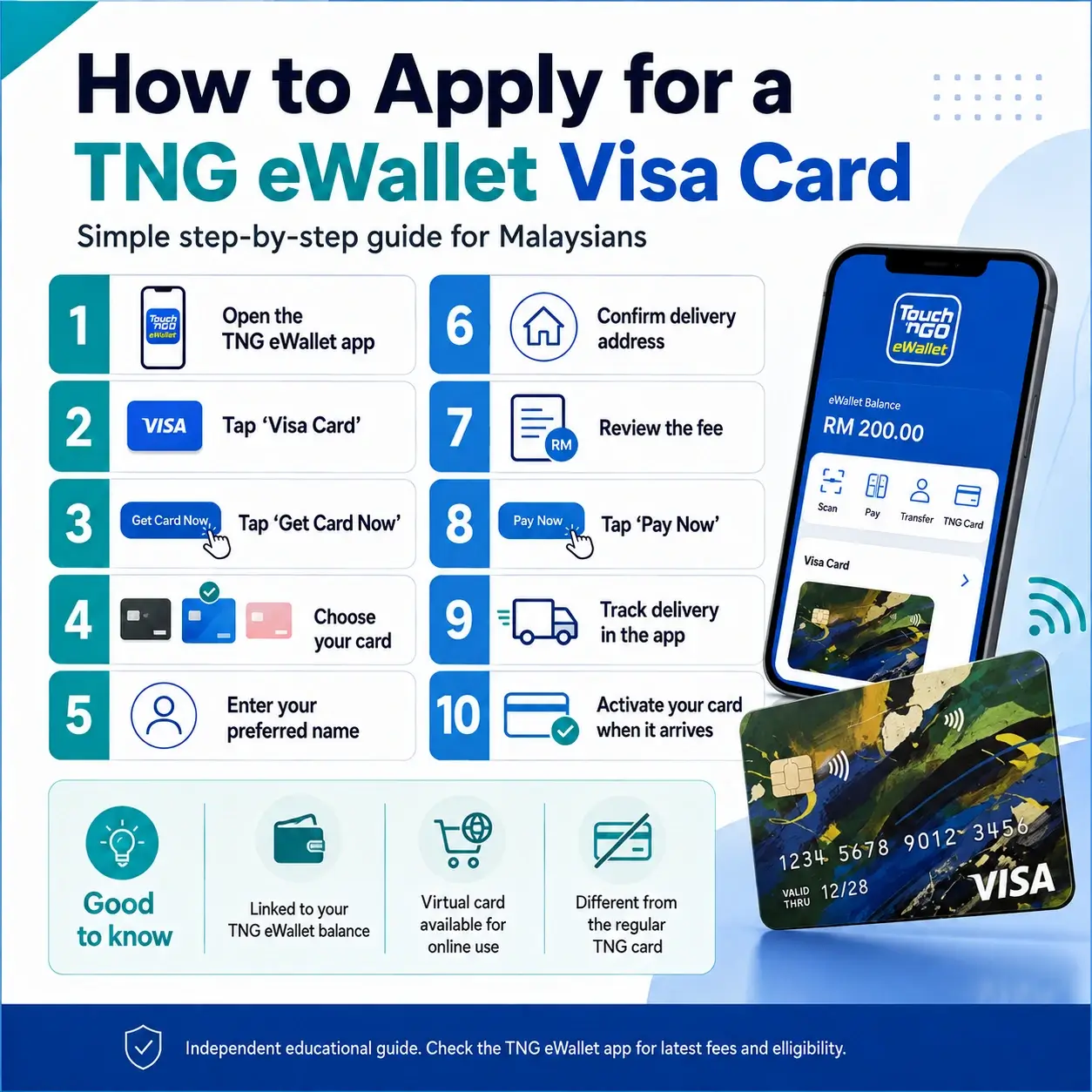
Looking for an easier way to pay using your Touch ’n Go eWallet balance?
The Touch ’n Go eWallet Visa Card is a prepaid Visa card linked directly to your TNG eWallet balance. You can use it for payments at merchants that accept Visa, including online purchases and participating physical payment terminals.
Unlike a credit card, there is no credit application or income requirement. The card uses the available balance in your TNG eWallet.
Here’s how to apply for one in Malaysia.
Before You Apply
According to Touch ’n Go eWallet, you need to meet the following requirements:
Be at least 12 years old
Have a registered Touch ’n Go eWallet account
Successfully complete eKYC identity verification
Be currently residing in Malaysia
You can only hold one TNG eWallet Visa Card at a time
Applications are made directly through the Touch ’n Go eWallet app.
Step 1 — Open the Touch ’n Go eWallet App
Open the latest version of the Touch ’n Go eWallet app on your smartphone.
From the homepage, look for the Visa Card option.
Depending on your app layout, the Visa Card section may also be accessible through your profile or card section.
Step 2 — Tap “Visa Card”
Select Visa Card.
This will bring you to the TNG eWallet Visa Card application page where you can view the available card option and its features.
Touch ’n Go currently offers two main options:
Visa Everyday Card
Designed primarily for everyday local spending.
Visa Travel Card
Designed more for overseas spending and travel, with benefits including up to 3% cashback on eligible overseas spending.
Choose the option that fits how you plan to use the card.
Step 3 — Tap “Get Card Now”
Once you have selected the Visa Card section, tap:
Get Card Now
You will then be guided through the application process inside the TNG eWallet app.
Step 4 — Enter Your Preferred Name
You will be asked to enter the preferred name that you want for your card.
Check the information carefully before continuing.
The TNG eWallet Visa Card is designed as a numberless physical card, meaning sensitive card details are stored securely inside the TNG eWallet app instead of being printed prominently on the physical card.
Step 5 — Confirm Your Delivery Address
Next, confirm the address where you want your physical Visa Card delivered.
Make sure your:
Name
Delivery address
Postcode
State
Contact information
are correct before proceeding.
This is important because your physical card will be shipped to the delivery address entered during the application.
Step 6 — Review the Card Fee
There is a one-time application charge.
As of May 2026, Touch ’n Go eWallet lists the total application cost as:
Visa Everyday Card — RM15
This includes an RM10 card application fee plus RM5 delivery.
Visa Travel Card — RM20
This includes an RM15 card application fee plus RM5 delivery.
There is also an RM8 annual fee, which is waived for the first year.
Fees and promotions may change, so always check the latest amount shown inside your TNG eWallet app before confirming your order.
Step 7 — Tap “Pay Now”
Once everything is correct, tap:
Pay Now
Complete the payment through your TNG eWallet.
Your application is now complete.
Step 8 — Track Your Visa Card Delivery
After your application has been successfully submitted, you can track the physical card directly from the Visa Card section inside your TNG eWallet app.
Touch ’n Go states that delivery usually takes up to 10 working days from the date of application.
A tracking URL will be available from your card dashboard once the shipment information becomes available.
Bonus: You Can Use Your Virtual Visa Card First
You don’t necessarily have to wait for the physical card before using your new Visa account.
Once your application is successfully completed, TNG eWallet provides a virtual Visa Card that can be used for supported online transactions while you wait for your physical card to arrive.
Your virtual card details can be accessed from the Visa Card dashboard inside the TNG eWallet app.
Step 9 — Activate Your Physical Visa Card
Once your physical card arrives, it needs to be activated before you start using it for physical card transactions.
Inside the welcome letter that comes with your card, you should find a:
QR code
and
4-digit activation code
Use either method to activate your physical card through the TNG eWallet app. The activation code does not expire and can only be used once.
Once activated, your physical TNG eWallet Visa Card is ready to use.
TNG Visa Card vs Regular Touch ’n Go Card — They Are Not the Same
This is something many Malaysians may find confusing.
The Touch ’n Go eWallet Visa Card and the normal Touch ’n Go Card / Enhanced Touch ’n Go Card are two different products.
The Visa Card is linked to your TNG eWallet balance and operates on the Visa payment network.
A regular Touch ’n Go Card stores its own card balance and is primarily designed for Touch ’n Go payment points such as transportation, toll and parking.
The TNG eWallet Visa Card can be used wherever supported by Visa, including participating merchants locally and overseas.
So when applying, make sure you select Visa Card, not the normal TNG Card option inside the app.
How Long Does the Whole Process Take?
The application itself can be completed directly through your smartphone.
Once approved and paid, your virtual card becomes available for supported online transactions, while the physical card normally takes up to 10 working days to arrive.
After receiving it, activate the physical card through the TNG eWallet app and you’re ready to go.
Quick Summary
Getting a Touch ’n Go eWallet Visa Card is straightforward:
Open TNG eWallet → Visa Card → Get Card Now → Choose your card → Enter your preferred name → Confirm your address → Pay → Track delivery → Activate your card.
Everything is managed through the TNG eWallet app.
Final Tip
Before submitting your application, double-check your personal details and delivery information and review the latest fees, benefits and terms shown inside the TNG eWallet app.
Card features, fees, promotions and eligibility requirements may be updated by Touch ’n Go eWallet from time to time.
Disclaimer: This article is an independent educational guide and is not an official publication of Touch ’n Go, TNG Digital or Visa. Touch ’n Go, TNG eWallet, Visa and related trademarks belong to their respective owners. Always refer to the official TNG eWallet app and official Touch ’n Go channels for the latest information.