
How to Use Your NFC Payment Ring: Two Easy Ways to Tap
3rd October 2026 | by Acan Shahid
Your first payment with a ring can feel a little unfamiliar. Where should you place your hand? How long should you hold it there? Can you pay while the ring stays inside its casing?
This guide walks you through both tapping methods shown in the tapje.la owner guides: wearing your NFC Payment Ring on your finger and holding it inside its casing.
The technique is simple: find the contactless reader, align your ring, hold steady, and check the payment result.
Before Your First Tap
Start with your ring ready for payment, following the setup instructions supplied with your order. This article explains tapping technique; it does not replace any setup or activation steps required for your ring.
At checkout, wait until the cashier has entered the amount and the terminal is ready. Look for the contactless symbol—the curved lines that show where to present your payment device. If you cannot find it, ask the cashier where to tap.
The reader position can vary between terminals. The screen is not always the tapping area, so use the terminal’s marking as your guide.
Method 1: Tap While Wearing the Ring
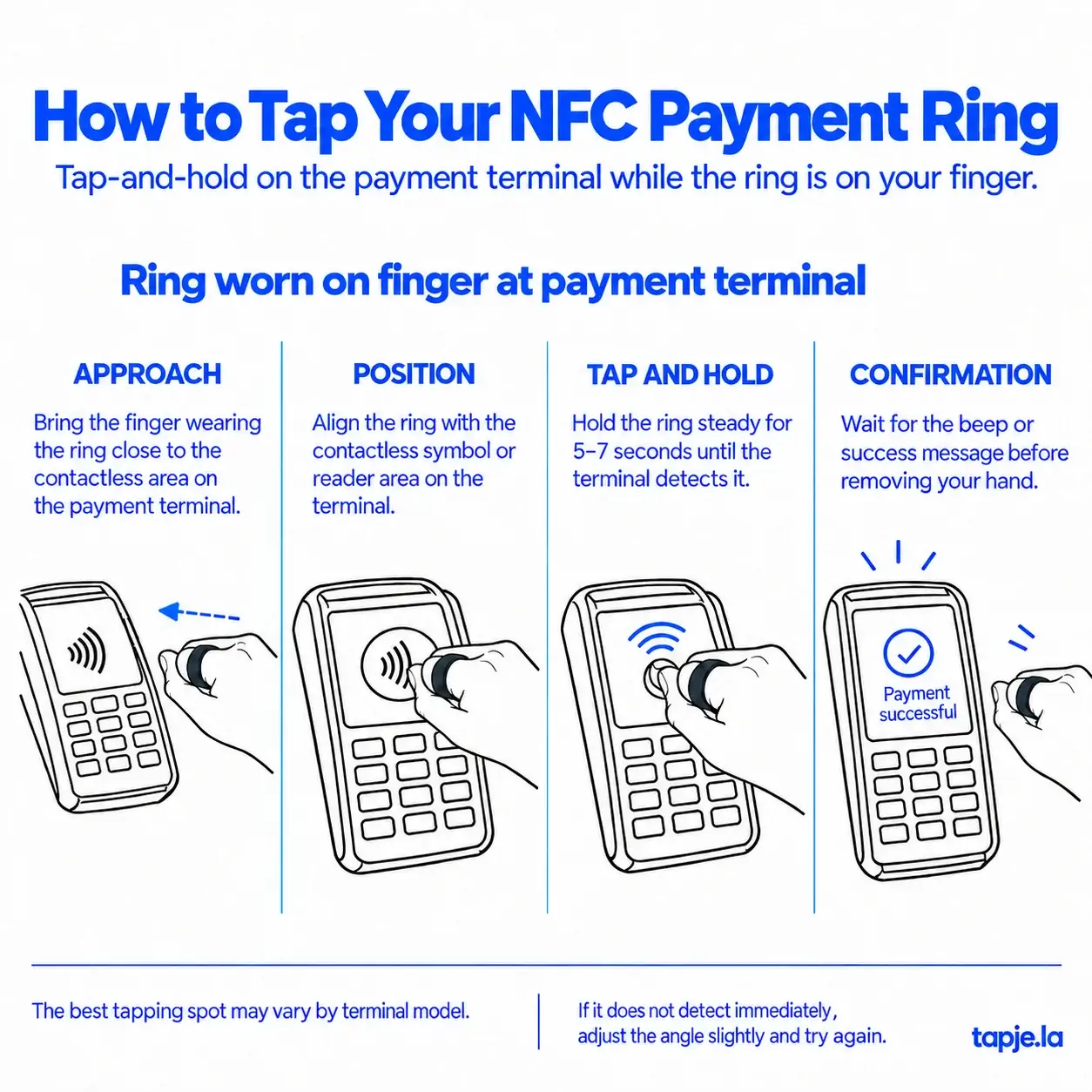
This is the everyday option: keep the ring on your finger and bring your hand to the reader.
1. Bring the Ring Close
Move the finger wearing your ring towards the terminal’s contactless area. Keep your hand relaxed so you can adjust its position comfortably.
2. Align the Ring With the Reader
Position the ring itself close to the contactless symbol or marked reader area. Think about where the ring is sitting, rather than simply placing your fingertips against the terminal.
3. Tap and Hold Steady
Keep the ring still while the terminal reads it. The tapje.la visual guide advises holding for 5–7 seconds, allowing time for detection.
Treat this as practical guidance, not a fixed processing time. If the terminal responds sooner, follow its on-screen instructions. Avoid waving your hand back and forth or repeatedly lifting the ring away while the reader is trying to detect it.
4. Check the Payment Result
Watch for the terminal’s response. A beep may indicate that the ring has been detected; check the screen or ask the cashier to confirm that payment was approved.
Follow any additional instructions shown before leaving the checkout.
Image placement: Insert the “Ring worn on finger at payment terminal” guide here.
Method 2: Tap With the Ring Inside Its Casing
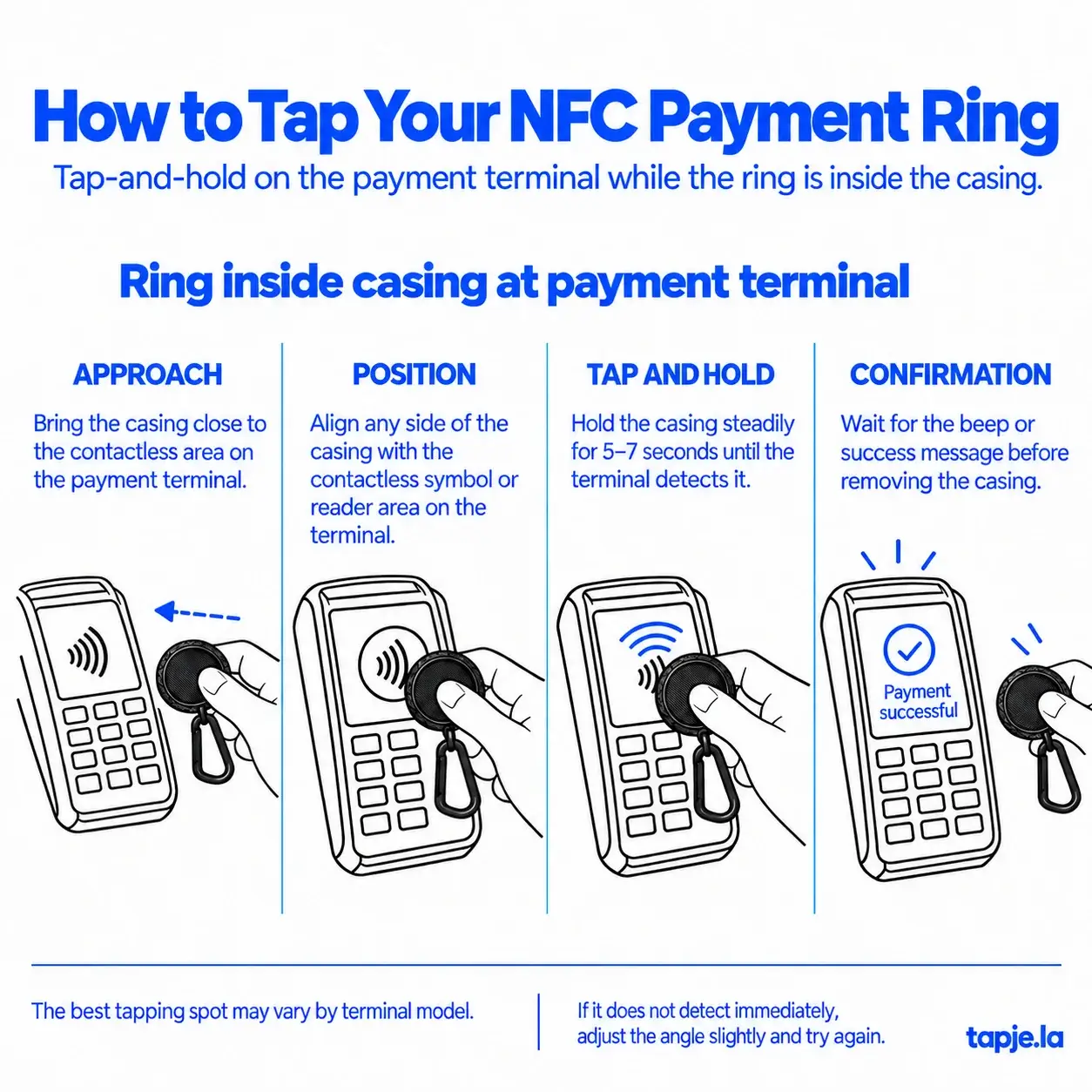
Prefer to hold the ring instead of wearing it? The second illustrated method lets you present it inside the casing shown in the tapje.la guide.
1. Bring the Casing Close
With the ring inside, move the casing towards the terminal’s contactless reader area.
2. Position the Casing Against the Reader Area
The guide shows that you can present any side of the casing to the reader. Start with whichever side feels comfortable to hold, keeping the part containing the ring close to the contactless area.
If it does not detect, change the angle or position slightly. “Any side” gives you flexibility when holding the casing; it does not mean every angle will read equally well on every terminal.
3. Hold the Casing Steady
Use the same tap-and-hold technique. Allow around 5–7 seconds, as shown in the guide, while watching for a response. Follow the terminal’s instructions if it responds earlier.
4. Confirm the Result
Check the terminal’s payment status before putting the casing away. If the result is unclear, ask the cashier to confirm it before trying again.
Image placement: Insert the “Ring inside casing at payment terminal” guide here.
Ring Not Detected? Try These Simple Adjustments
A missed read does not automatically mean something is wrong with your ring. Start by checking its position and the terminal’s readiness.
| What you notice | What to try |
|---|---|
| Nothing happens when you present the ring | Ask whether the terminal is ready, then locate the marked contactless area. |
| You are making several quick taps | Pause and use one steady hold, following the guide’s 5–7-second advice. |
| The terminal still does not detect it | Move the ring slightly or adjust its angle, then hold still again. |
| It reads differently on another terminal | Find that terminal’s reader area and adjust your position to suit it. |
| The terminal beeps but the outcome is unclear | Read the screen and ask the cashier to confirm the transaction status before retrying. |
| The screen says “declined” | Ask the cashier to confirm the result and follow the displayed instructions. A decline is different from no detection; changing the tapping angle may not resolve it. |
Frequently Asked Questions
Do I need to remove the ring from my finger to pay?
No. The on-finger method shown in the guide lets you present the ring while wearing it. Align the ring with the reader and hold it steady.
Can I pay with the ring inside its casing?
Yes—the supplied guide demonstrates this method using the illustrated casing. Keep the ring inside, bring the casing close to the reader, and hold it steady. This guidance does not establish compatibility with other cases or holders.
Must I hold it for exactly seven seconds?
No. The guide recommends 5–7 seconds to allow detection, but the terminal may respond sooner. Watch the screen and follow its instructions.
Where should I tap my NFC Payment Ring?
Use the contactless symbol or marked reader area as your starting point. The best position varies by terminal model, so a small adjustment can help if the first attempt does not detect.
Does a beep mean my payment is successful?
Do not rely on the sound alone. Check for an approved or successful payment result on the screen, or confirm with the cashier.
Ready for Your Next Tap?
Whether your ring is on your finger or inside its casing, remember these four steps: approach, position, hold, confirm.
Save the illustrated guides for your next checkout. A steady hold and the right reader position make the technique easier to get comfortable with.
Need help with your ring? Get in touch with tapje.la. You can also explore the tapje.la NFC Payment Ring for product information.
tap je la.