How to Use TNG NFC Ring: Toll, Parking & MRT
14th October 2026 | by Acan Shahid
You reach the reader. Your card, naturally, has decided to disappear.
Check the pocket. Search the bag. Somehow, everything is within reach except the one thing you need.
Sound familiar?
If you are wondering how to use your tapje.la TNG NFC Ring, this guide walks you through the tapping technique at toll, parking and MRT readers.
You have two ways to use it: wear the ring on your finger or hold it inside its casing.
Whichever you choose, start with one simple habit:
Position it against the reader. Hold it steady. Wait for confirmation.
Before Your First Tap
New to the card behind the technology? Visit the official Enhanced Touch ’n Go Card page to learn about its features and NFC reload function.
That page provides information about the official card. For positioning your tapje.la ring against a reader, follow the illustrations and instructions in this guide.
Ready? Let’s start with the two ways to hold your ring.
Two Ways to Tap Your TNG NFC Ring
On Your Finger
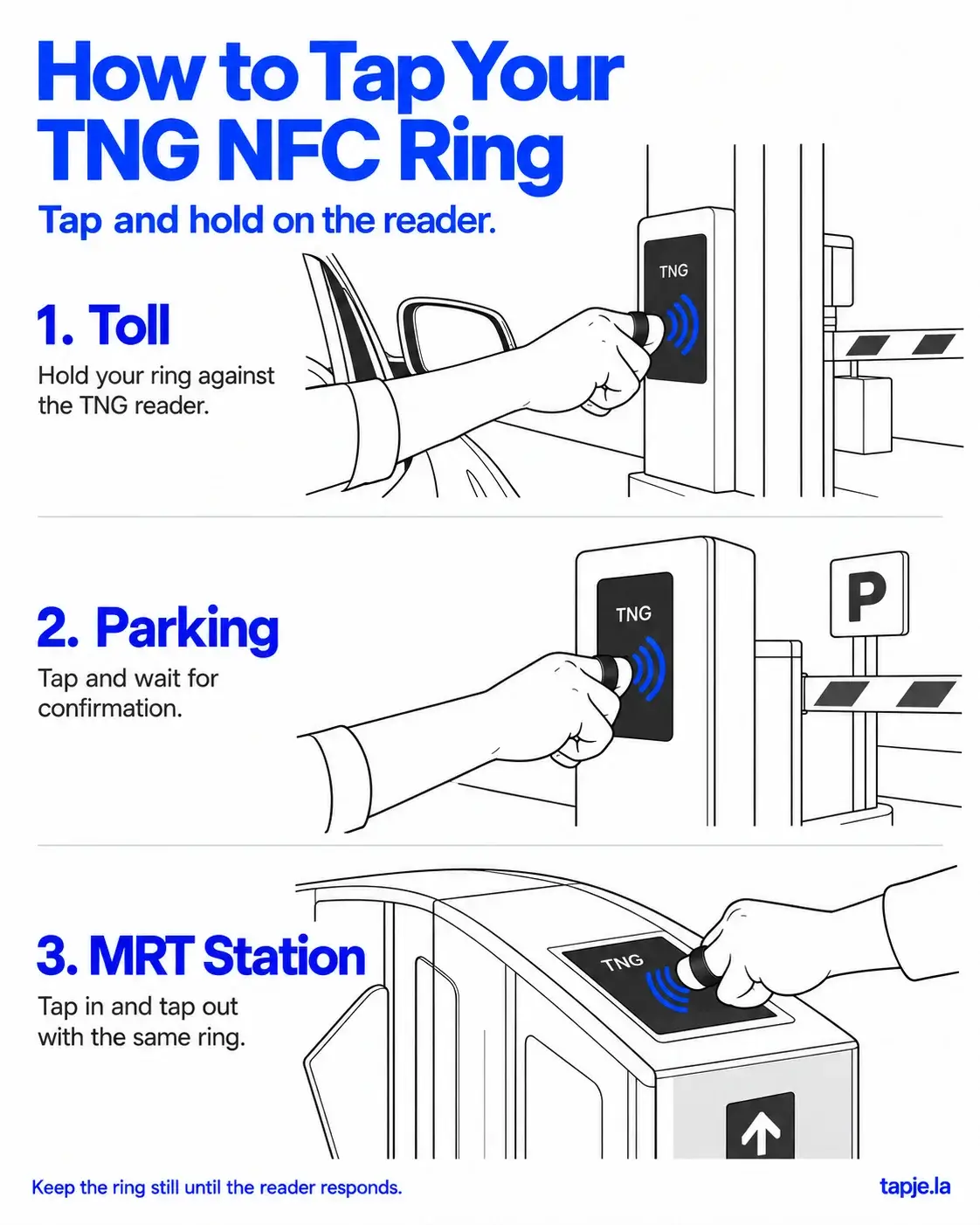
Bring the ring itself against the reader’s scanning area, following the hand position shown in the illustration.
Curl your fingers comfortably and adjust your hand so the ring reaches the reader. The important detail is where the ring sits not simply whether your fingertips are touching the machine.
Keep your hand steady until the reader responds, then move it away once the transaction is confirmed.
Inside Its Casing
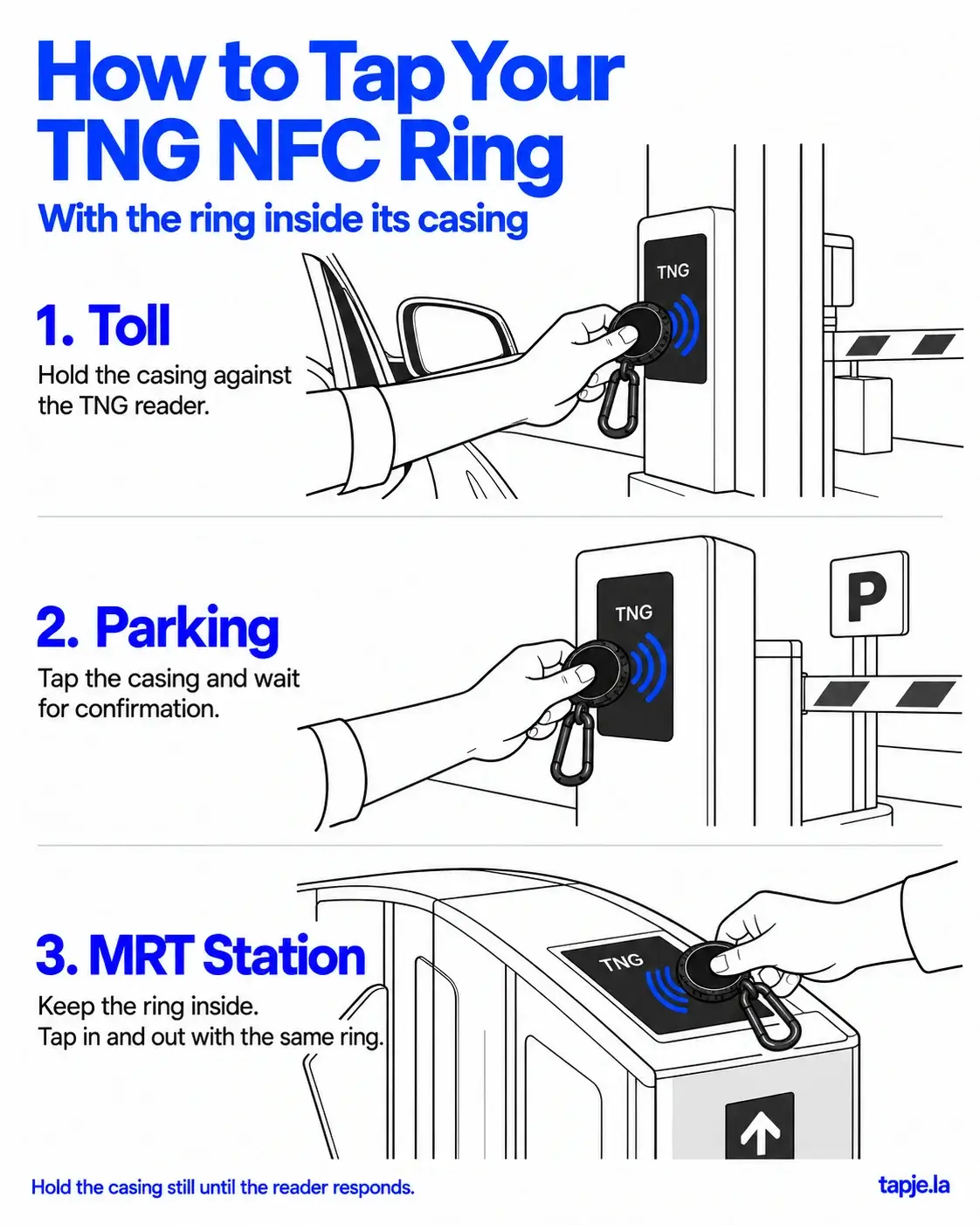
Prefer to carry your ring instead of wearing it? Leave it inside its casing and hold the casing against the reader’s scanning area.
Keep a secure grip and hold it steady until the reader responds.
The ring must remain inside the casing. The casing is a holder; it does not make the transaction on its own.
Both methods follow the same rhythm: position, hold and wait.
How to Tap Your Ring at a Toll Reader
You have reached the toll reader. Once your vehicle has stopped safely, bring your ring towards the scanning area.
If you are wearing it, position your hand so the ring rests against the reader, as shown in the guide.
If you are using the casing, hold it securely against the reader with the ring inside.
Keep it steady until the reader confirms the transaction. Wait for the barrier to open before moving forward.
There is no need for a dramatic wrist flick. Find a comfortable position and give the reader time to respond.
How to Tap Your Ring at a Parking Reader
You know that moment when you arrive at a parking entrance and start searching for your card while another car waits behind you?
Having your ring ready means one less thing to search for.
At a parking reader that accepts Touch ’n Go, place your ring, or the casing containing it, against the scanning area.
Hold it there and wait for confirmation before pulling away.
Let the reader’s response be your cue to move.
It is an easy habit to forget when you are in a hurry. A quick touch followed by immediately moving your hand away may not give the reader enough time to register the ring.
How to Use Your Ring at an MRT Gate
At the MRT gate, bring your ring against the scanning area and keep it still until your entry is confirmed.
Using the casing? Keep the ring inside and hold the casing against the scanning area instead.
Once the gate opens, head through.
When you reach your destination, remember this detail:
Tap in and tap out with the same ring.
If you entered using your ring, keep that ring ready for your exit too. Make it part of your routine before you reach the gate, especially during a busy commute.
If the Reader Does Not Respond
It is tempting to keep tapping faster when nothing happens. Instead, take a moment to check your position.
- Check the contact point. Bring the ring itself against the scanning area.
- Adjust the angle. Follow the position shown in the illustrations.
- Keep it steady. Avoid sliding it around or repeatedly pulling it away.
- Check the casing. If you are using it, make sure the ring is inside.
- Look at the reader’s message. An error message may require a different response from simply repositioning the ring.
Reader response can vary, so avoid expecting every tap to register instantly. If you are stuck at an MRT gate, ask station staff for assistance.
Your Ring, Your Everyday Routine
Worn on your finger or carried inside its casing, the tapping habit stays the same:
Position. Hold. Wait for confirmation.
Once you become familiar with the hand position, it is one less thing to figure out when you reach the reader.
Thinking about adding a ring to your routine? Explore the TNG NFC Ring designs and sizes, and review the product details and customization information before ordering.
Your ring. Your routine. tapje.la.