
12th June 2026 | by Umar Shahren
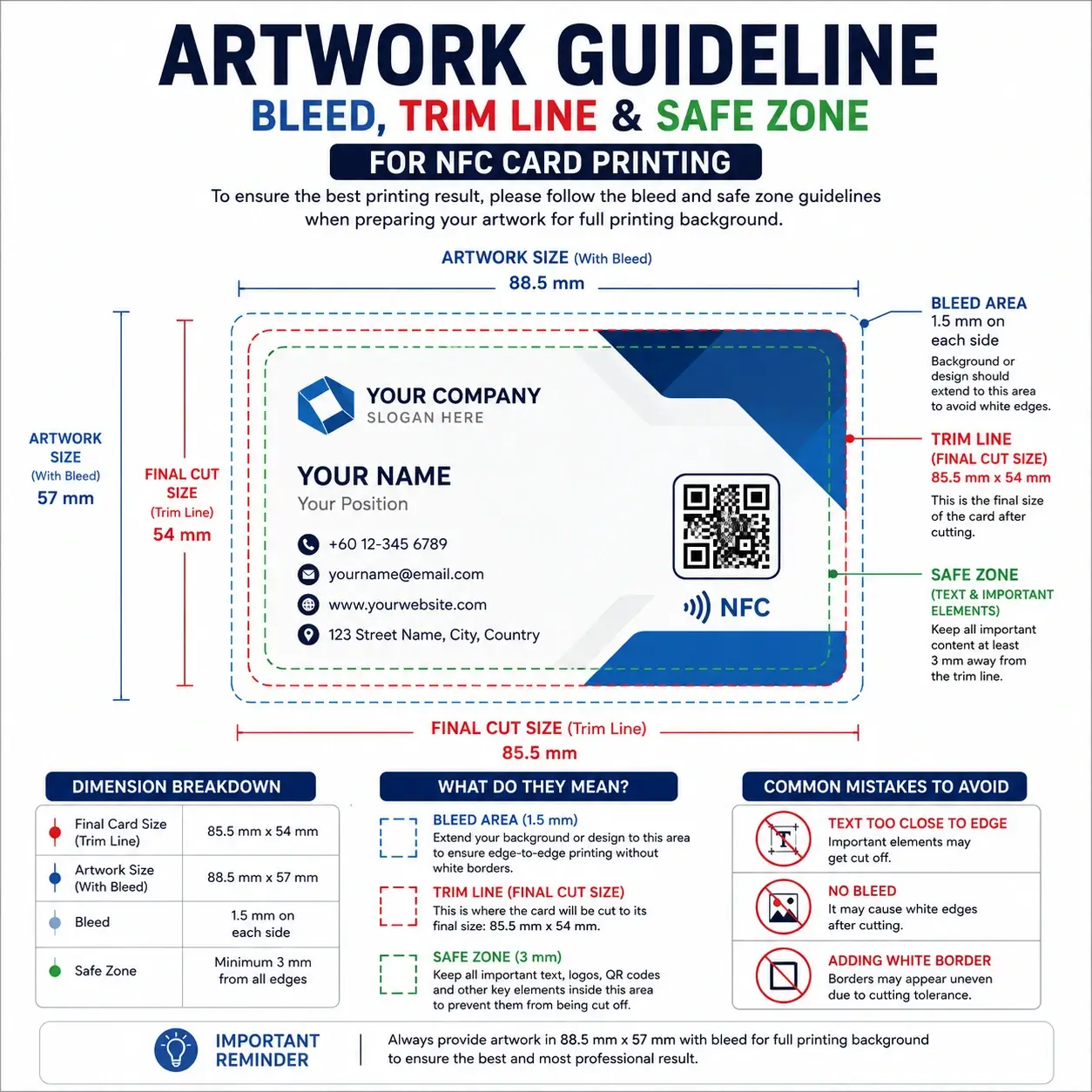
When preparing artwork for your NFC Business Card, TNG NFC Card, or custom printed card, one of the most common issues we encounter is incorrect file sizing.
Many clients design their artwork exactly to the card size, only to discover that important elements such as logos, text, or background colours are cut off during production.
To ensure the best printing result, it is important to understand three key areas:
Bleed Area
Trim Line (Final Card Size)
Safe Zone
Final Card Size
The finished size of our card is:
8.55 cm × 5.40 cm
(85.5 mm × 54 mm)
This is the actual size of the card after cutting.
Artwork Size with Bleed
For cards with:
Full background colour
Full artwork coverage
Images extending to the edge
Patterns reaching the border
Please provide your artwork in:
8.85 cm × 5.70 cm
(88.5 mm × 57 mm)
This includes a 1.5 mm bleed on each side.
Why Bleed Is Important
During production, cards are printed on larger sheets before being cut to their final size.
Even with professional cutting machines, there can be a slight cutting tolerance of a fraction of a millimetre.
Without bleed:
❌ White lines may appear around the card edges.
With bleed:
✅ The artwork extends beyond the cut line, ensuring a clean edge-to-edge finish.
Recommended Safe Zone
To prevent important information from being cut off, keep all critical elements inside the safe zone.
Examples:
Company logo
Name
Phone number
Email address
QR code
Social media icons
Recommended safe margin:
3 mm from all card edges
Final Cut Size:
85.5 mm × 54 mm
Bleed:
1.5 mm on all sides
Safe Zone:
Minimum 3 mm from all edges
Dimension Breakdown
| Area | Dimension |
|---|---|
| Final Card Size | 85.5 mm × 54 mm |
| Artwork Size with Bleed | 88.5 mm × 57 mm |
| Bleed | 1.5 mm each side |
| Recommended Safe Zone | 3 mm from edge |
Common Mistakes to Avoid
1. Designing Exactly at Card Size
Many clients submit artwork at:
85.5 mm × 54 mm
This is only suitable when there is no background colour extending to the edges.
2. Placing Text Too Close to the Edge
Avoid placing text or logos directly near the border.
Leave at least 3 mm spacing to ensure everything remains visible after trimming.
3. Using White Borders
White borders require extremely precise cutting alignment.
Even a small production tolerance can make borders appear uneven.
For best results, use a full bleed design instead.
Need Help?
If you’re unsure whether your artwork meets our printing requirements, simply submit your design through tapje.la and our production team will review it before printing.
Following the correct bleed and safe zone guidelines helps ensure your NFC card looks clean, professional, and exactly as intended.